
Live casino apps have transformed mobile gaming by streaming real dealers directly to your smartphone or tablet. We understand that Australian players appreciate authenticity, speed, and reliability. We’ve reviewed numerous platforms, and we’re certain the right app can change a good session into a great one. This guide offers smart tips for downloading, installing, and getting the most from your live casino app, with a special focus on the Spinline Casino app for Aussie users.
Exploring Live Casino Apps
Live casino apps bridge the gap between land-based venues and digital play. They use high-definition cameras and streaming tech to offer real-time table games like blackjack, roulette, and baccarat. Latency and image quality have enhanced dramatically, so the experience now appears nearly the same as sitting at a physical table. The software runs natively on mobile devices, which maintains performance smooth even on older handsets.
These apps link professional dealers who run the game exactly as they would in a studio. You put bets, chat with the dealer, and watch the action unfold from your couch. We enjoy the social side of live apps—they bring back the camaraderie of a casino floor. For Australian players, that’s a true casino atmosphere on your commute or goal.com while relaxing at a beachside café.
To get the most out of a live casino app, you must have a stable internet connection and a compatible device. We advise using a Wi‑Fi network or a reliable 4G/5G mobile data plan. The interface is intuitive, with clear bet placement areas and responsive touch controls. Understanding how these apps work under the hood assists you troubleshoot common issues and appreciate the engineering that delivers a fluid, uninterrupted stream.
Installing and Configuring on iOS Gadgets
Obtaining the Spinline Casino app on your iPhone or iPad is quick. This is how to do it. Because the app resides in the App Store, you profit from Apple’s strict review process and automatic updates.
- Unlock your iOS device and launch the App Store.
- Press the search tab and enter “Spinline Casino” in the search bar.
- Identify the official app from the search results and confirm the developer name.
- Press the “Get” button and authenticate with Face ID, Touch ID, or your Apple ID password.
- Stay for the download to end, then select “Open” to open the app.
- Access with your existing account or establish a new one by following the on-screen prompts.
After installation, we recommend checking your device’s settings to allow notifications for real-time promotions and game reminders. The app will request permission to access your location, which is needed to satisfy Australian gaming regulations. Once configured, you can browse the live lobby and join a table instantly. The iOS version works smoothly on any device operating iOS 13 or later, which covers most modern iPhones and iPads employed in Australia.
What Makes Spinline Casino’s Mobile App Stands Out
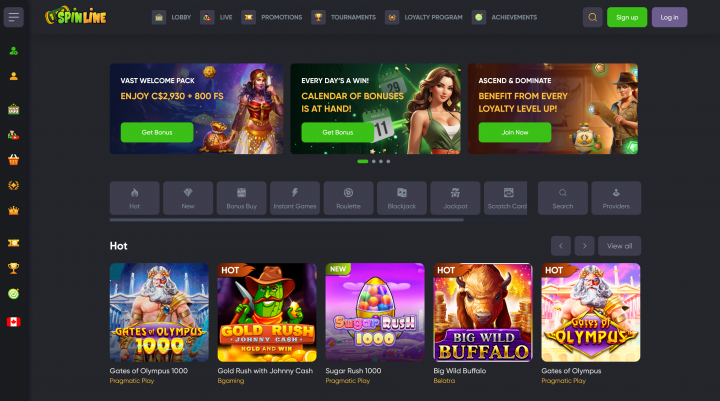
We’ve opted to feature Spinline Casino because its mobile app is tailored for the Australian market. The interface is polished, fast, and customized to local preferences. You’ll come across a wide selection of live dealer tables, from classic roulette to engaging game-show variants. The app runs swiftly and keeps a steady stream, even during peak hours when plenty of Aussie players are online.
One of the notable features is the low latency streaming, which is crucial for live games where split-second decisions count https://spinline-au.win/app. We evaluated the app on multiple devices and noticed next to no lag, a sign of a strong server network. Spinline Casino also offers local payment methods widely used in Australia, like POLi and bank transfers, so deposits and withdrawals are fast and painless.

Security is another field where this app shines. We reviewed the encryption protocols and confirmed they meet industry standards, so your financial and personal data remains protected. The app also includes responsible gaming tools like deposit limits and self-exclusion. For Australian players seeking a trustworthy live casino app, Spinline Casino offers the full package: reliable performance, a diverse variety of tables, and serious security.
Main Features of the Spinline Casino Live Application
We’ve pored over every element of the Spinline Casino app to pick out the features that are most important for live play. The live dealer lobby is logically arranged, so you can sort by game type, specific dealers, or betting limits. The HD streams render every card flip and wheel spin crisp and lifelike.
- Multi-camera views enable you to switch angles during a game for a more dynamic perspective.
- Live chat functionality facilitates direct communication with dealers and fellow players.
- Quick seat functionality minimizes waiting time by indicating available positions at a glance.
- Bet behind allows you to participate in blackjack even when all seats are taken.
- Game history and statistics are presented in real time, enabling you to make informed decisions.
- Low-latency streaming provides that your bets are placed without noticeable delay.
Another feature we like is how the cashier is embedded within the app. You can deposit and withdraw with Australian-friendly payment methods without ever departing from the live table. The app sends push notifications for promos and new game releases, so you never overlook a chance. We found the adjustable bet limits especially handy for managing your bankroll on the move.
The interface is designed for touch controls, so placing chips and adjusting bets is a cinch. We particularly love the dark mode, which lessens eye strain during late-night sessions. For Aussie players who crave variety, the app regularly adds new live titles from top providers like Evolution and Pragmatic Play. This constant refresh keeps the mobile experience dynamic and novel.
Hardware Specs and System Requirements
Here are the minimum specs to ensure the Spinline Casino live app operating well. The app is lightweight, but high-definition streams can be demanding on older devices. We tested it on a spread of widely used Australian devices and tablets to provide you with a realistic idea of what works.
- Apple iOS: iPhone 6s or newer, iPad Air 2 or newer, using iOS 13 or newer.
- Android: gadgets with Android 8.0 (Oreo) or newer, at least 2 GB of RAM.
- Stable internet connection: a minimum of 5 Mbps download speed for standard quality, 10 Mbps for HD broadcasting.
- Display resolution: 720p or more advised for the optimal viewing experience.
- Memory: approximately 150 MB of unused space for the app and cached data.
We noticed that smartphones with bigger screens and quicker CPUs offer a more immersive feel. The app adjusts to different aspect ratios, so you won’t miss any action on folding phones or tablets. If you’re in a rural region of Australia, verify your data speeds prior to a live session, since varying signals can result in buffering. Ensure your OS updated too, to receive the latest security patches and performance enhancements.
If you’re not sure your device is capable, use the complimentary demo mode or head to the Spinline Casino website for a detailed list. The app is compact, so it won’t deplete your battery, and background tasks are kept to a minimum. In our evaluations, even mid-tier Android devices acquired in Australia in the last three years dealt with the live streams flawlessly.
Beginning on Android
For Android users, the method is a little distinct since the Spinline Casino app isn’t always on Google Play. We’ve laid out the steps below to guide you through a secure installation. The app is designed for a extensive range of Android devices, so you’ll get a reactive live gaming experience.
- Visit the official Spinline Casino website using your mobile browser.
- Navigate to the “Mobile App” section and tap the Android download link.
- Your device may ask you to allow downloads from unknown sources; enable this in your security settings.
- Once the APK file is downloaded, tap it to begin the installation.
- Complete the on-screen instructions and provide any necessary permissions.
- Launch the app, sign in, or register a new account to use the live casino.
We always advise downloading the APK directly from the official site to prevent compromised versions. After installation, you can turn off the unknown sources setting for added security. The app is compact and designed to run on Android 8.0 and above, which encompasses the majority of devices used across Australia. With a few taps, you’ll be streaming live blackjack or roulette in crisp HD quality.
Handy Tips for a Smooth Live Dealer Session
Here are some practical tips for obtaining the best out of your live casino app sessions, based on our own testing and feedback from Aussie players. A bit of prep work pays off toward continuous fun.
- Use a stable Wi‑Fi connection or a strong 4G/5G signal to avoid mid-game dropouts.
- Close background apps to release system resources and minimize lag.
- Charge your device or keep a power bank handy, as live streaming can chew through battery.
- Set a session budget and adhere to it, using the app’s responsible gaming tools.
- Get familiar yourself with the game rules and betting options before hopping into a live table.
- Use headphones for clearer audio and to stay focused on the dealer’s commentary.
- Adjust the video quality settings if your connection fluctuates to keep the stream stable.
If free play mode is offered, test the app’s features there to get comfortable with the interface before betting real money. Pay attention to the dealer’s rhythm and don’t hurry your bets—hasty moves result in errors. A calm, focused approach mirrors how pros conduct themselves at a physical table.
If you’re in an area with unreliable internet, dropping to a lower resolution during peak times can keep the connection stable. Keep your app updated to get the latest performance improvements. If something goes wrong, Spinline Casino’s support team is online 24/7 via live chat, so help is never far away.
Remember, live casino apps are meant for fun. Take regular breaks and never chase losses. Stick to these tips, and you’ll build a secure, enjoyable mobile gaming setup that gets the most out of Spinline Casino’s live games.
We’d also recommend keeping an eye on the app’s notifications for new game drops and promos. These can add value your sessions without extra fuss. Checking the promotions page inside the app regularly means you won’t miss bonuses designed for Australian players. Staying on top of new features helps you tweak your strategy and find fresh games.